
LINE Yahoo announced on October 7th that it has introduced a new "Scroll Preview" feature on its official website, allowing users to check past messages without opening the chat room or marking them as read. The feature also supports Android smartphones and is currently available for free.
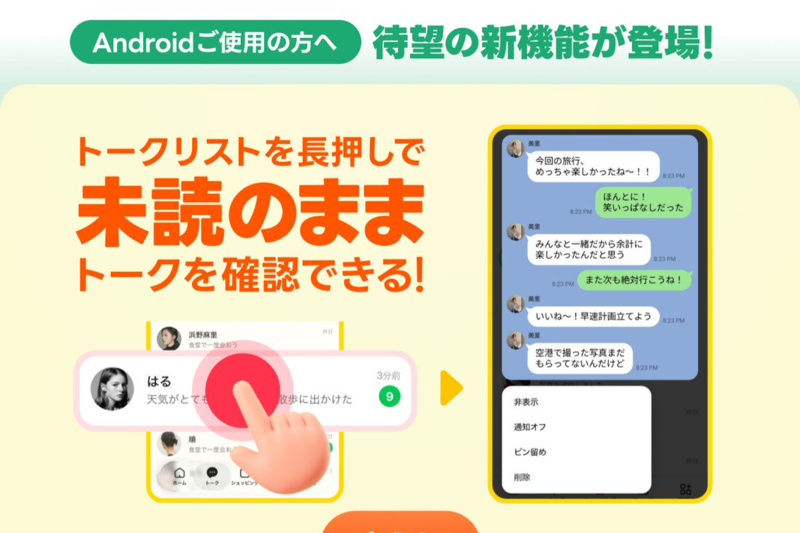
By long-pressing a chat you wish to preview in LINE's chat list, a message preview screen will appear. Scrolling the screen up and down allows you to read not only the latest messages but also scroll back through past conversations. If you tap outside the preview screen to close it, the message will not be marked as "Read" for the sender.
While iOS devices like iPhones previously allowed users to long-press a chat room to preview some messages, this new feature now enables scrolling to view past conversations. Moreover, the same functionality is now available on Android smartphones.
To use the feature, update the LINE app to version 26.15.0 or later, then enable "Scroll Preview" from "Home" → "Settings" → "LINE Labs." It supports one-on-one chats, group chats, official accounts, Open Chats, and more. While available on smartphone and iPad versions, it is not supported on PC versions or Android sub-devices.
Currently, Scroll Preview is offered for free within "LINE Labs," which provides experimental features. However, it is planned to transition to a benefit of the paid service "LYP Premium" in the future. The end date of the free offering has not been disclosed, and it may become unavailable without prior notice.
🤖 To all Android users: A LINE message just arrived right before work starts 💬 You don't have time to reply, but you want to read the message— At times like that, a feature has been born that lets you quickly check messages without marking them as read! 🙌 *Scroll Preview is currently in its free trial period https://t.co/fUAgVlz3zY— LINE (@LINEjp_official) October 13, 2026