
Just Adding AI is Transforming Things into Something Different
Lately, 'AI' is everywhere, and just as digital gadgets were dramatically transformed by apps and the internet, I feel like we are now witnessing AI integration fundamentally changing the role of digital devices.
Personally, a category I'm paying close attention to is 'voice recorders'.
It goes without saying that AI has enabled 'fast and accurate transcription', but I believe it's also in the midst of a major evolution as a productivity-enhancing device, expanding its utility as an input device, capturing life logs, and supporting thoughts and actions beyond mere recording.
While email and chat tools are for communication, they also function as archiving tools, preserving interaction history for later review. The same applies to smartphone cameras and screenshots; they're not just for beautifully preserving memories, but have become everyday tools for easily taking notes.
I feel that the same phenomenon is now happening with 'voice recorders'.
Expanding Future Possibilities (Insights), Not Just Fixing the Past (Recording)
However, many readers might not quite grasp this yet.
Its value is clear once you use it, but it requires a slight shift in perspective. Because of this, its benefits can be hard to convey, and a truly convincing explanation is difficult to provide. Let me first explain my own understanding.
Traditional voice recorders were just recording devices. In other words, they were devices solely for 'preserving audio'.
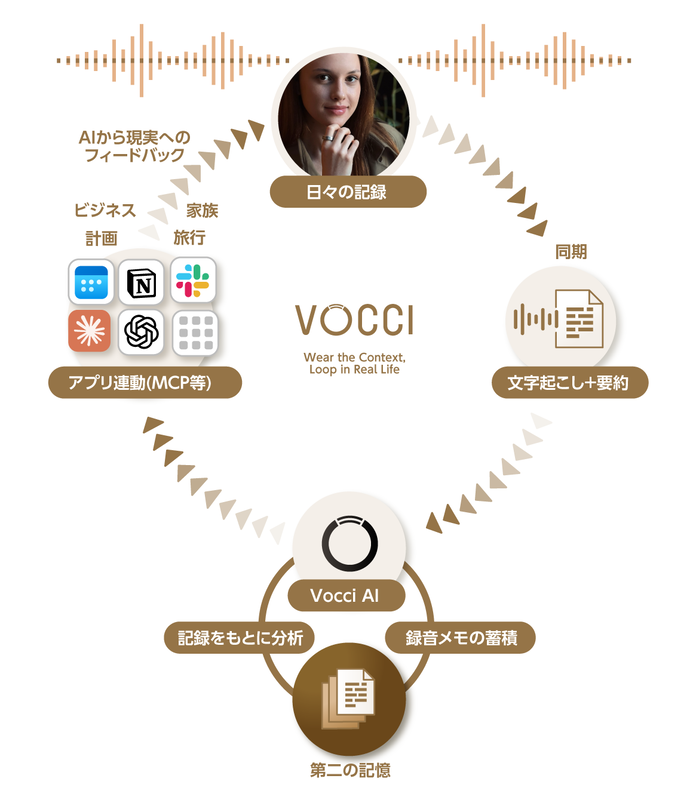
However, the ability to automatically transcribe, aggregate that text in the cloud, and re-utilize it with AI creates new value. It 'compresses the time spent organizing information,' 'unearths important points that tend to get buried,' and 'suggests what to do next.' It has become a presence akin to a partner or coach.
While previous voice recorders could only 'fix the past,' they will now 'generate beyond the record'. In other words, the emphasis shifts to 'how to utilize the information obtained'.

The Vocci ring
Against this backdrop, a remarkable recording device has emerged.
It's the ring-shaped device 'Vocci' (pronounced Vot-chee) developed by Gyges Labs. As a writer with many interviews and meetings, I spend my days constantly organizing information, and I felt this device has the potential to change that routine.

The sample I received came in impressive packaging.
In this article, I will detail (1) what kind of product Vocci is, (2) how to use it, (3) my honest impressions after using it, and (4) important points to be aware of during use.
Vocci is a Ring-Shaped Voice Recorder
Now, when it comes to ring-shaped gadgets, most people probably think of 'smart rings'. These are devices that acquire healthcare data like heart rate and sleep status for health management, or those equipped with payment functions that allow touch-based transactions.
Vocci is a ring with different functionalities.
While it looks like a familiar ring, it contains a high-performance MEMS microphone capable of clearly picking up conversations up to 5 meters away, making it a product that can record and transcribe audio. By recording, it collects logs of daily interactions, meetings, and discussions, and by using AI, these logs can be analyzed later or utilized for problem-solving. That's what the AI device Vocci is.
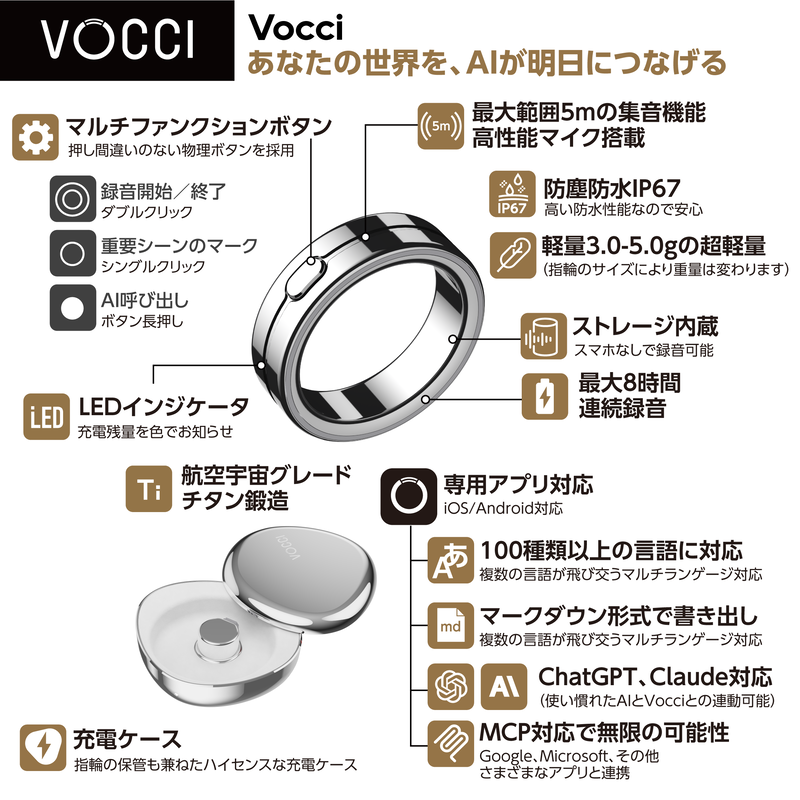
Vocci explanatory illustration
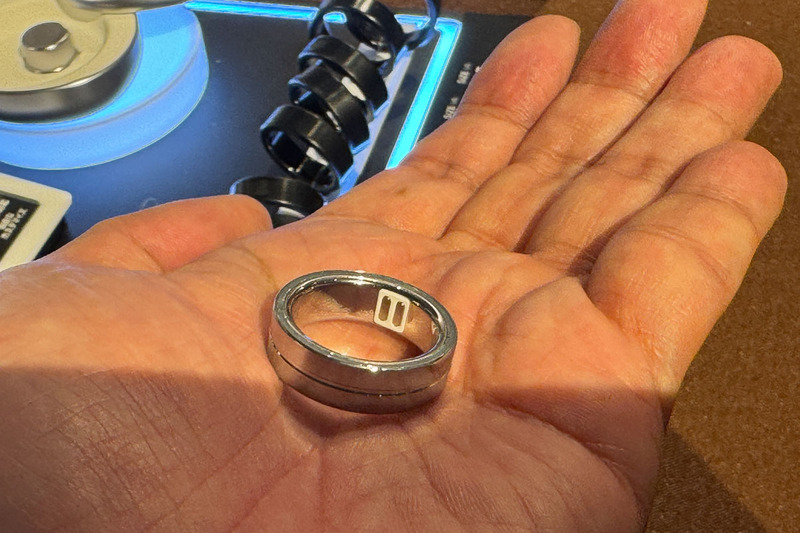
The titanium ring has a very simple appearance. The device itself is light, so you can wear it without noticing and carry it around daily. With IP67 dust and water resistance, there's no need to remove it when washing hands or even showering. It's a tough device.
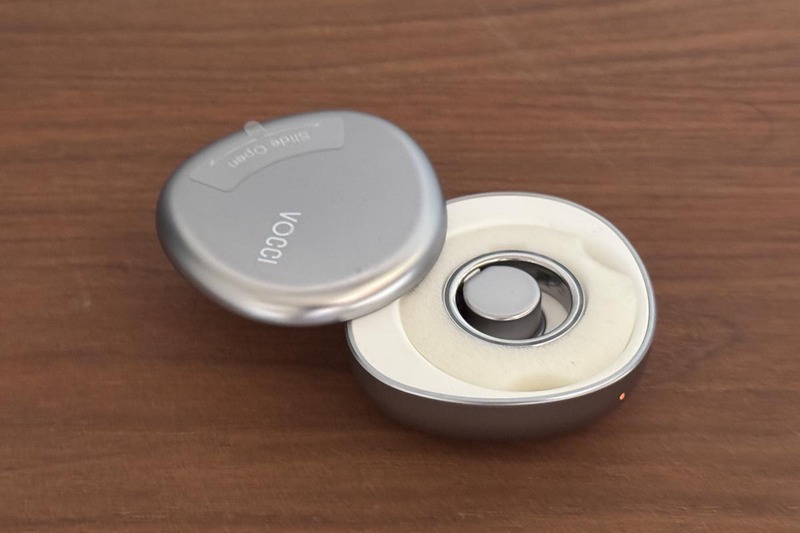
A charging case is included, allowing for two full charges when carried together.
The device has 64MB of memory and built-in Bluetooth communication for connecting to a smartphone app. The ring alone can record for over 8 hours, allowing you to handle long meetings or full-day event coverage even without a smartphone connection.
Always wear and carry it, starting recording immediately when needed, such as for daily conversations or meetings. Upload it to the cloud, and the content will be instantly transcribed into text.
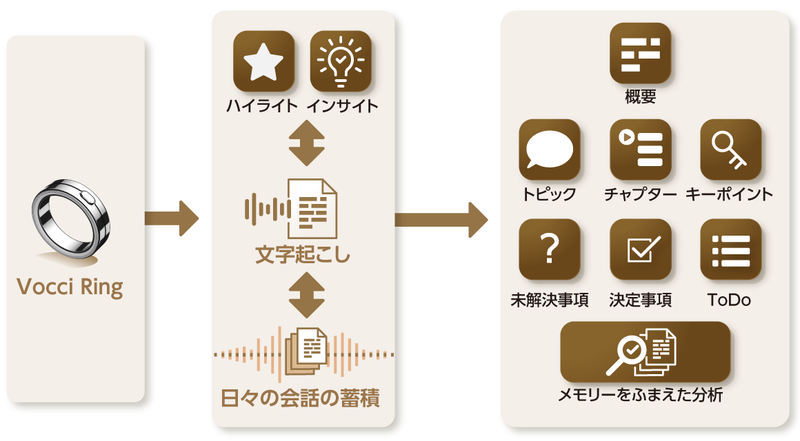
Data recorded with the Vocci ring is aggregated in the cloud, transcribed into text, and summarized according to templates.
As is common with recent AI meeting minute services, this data is analyzed immediately upon upload, and a 'summary' is created, compiling 'decisions' and 'next actions'.
This allows for easy review of what was heard and discussed, and there's also a dedicated AI chat called 'Vocci AI' where you can enter prompts to delve deeper. It's a device that can help you gain new insights and assist in document creation.
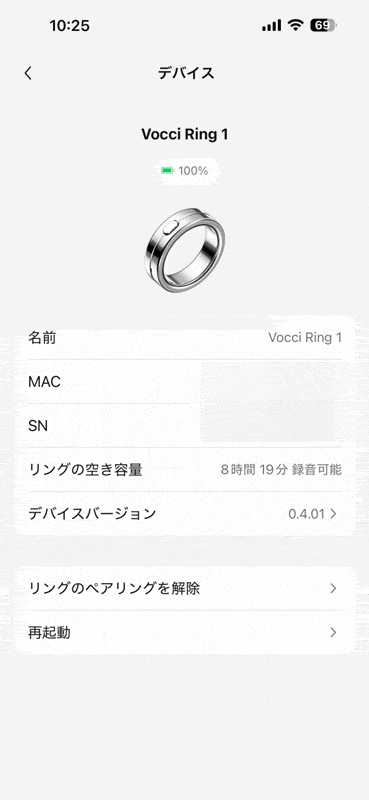
Vocci app
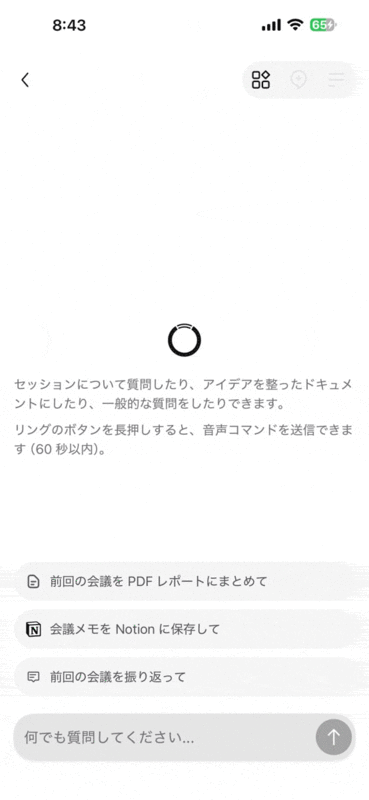
'Vocci AI' screen. You can delve deeper into recorded content with prompts or utilize it for document creation.
Simple Operation: Just Double-Click a Button
Vocci's operation is extremely simple. Recording starts with a double-click of the device's button and stops with another double-click. During recording, the ring's LED glows white, allowing you to confirm that recording is in progress.
A marker function is also available during recording. This feature allows you to mark important sections by single-clicking the button during recording. These marked sections are compiled under the 'Highlights' section in the app for easy reference.
It's useful for reviewing points you personally deemed important, rather than just AI suggestions, or when you want to re-listen to a specific part more carefully later.
Uploading to the cloud also proceeds automatically, eliminating hassle. Once the ring is paired with your smartphone via the app, recorded audio data is automatically registered to Vocci's cloud. (If recorded offline or using Vocci standalone, upload begins when a connection is established).
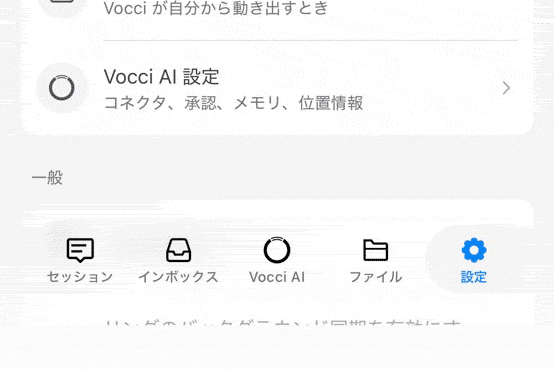
The bottom of the app features tabs like 'Vocci AI' and 'Sessions'.
Transcription and summary creation also proceed simultaneously, and the results can be managed collectively under the 'Sessions' tab in the app. Tapping the Sessions tab displays information for each recording, such as the title automatically generated by AI from the conversation content, a summary of the content, recording date and time, and recording duration.
Tapping on a session of interest allows you to view the full transcription.
The transcribed text includes speaker recognition and is divided into easily readable sections of about 4-5 lines. Tapping on this text allows you to instantly play back the corresponding audio. Additionally, locations highlighted during recording are compiled in a separate tab ('Highlights'), making them quick to find.
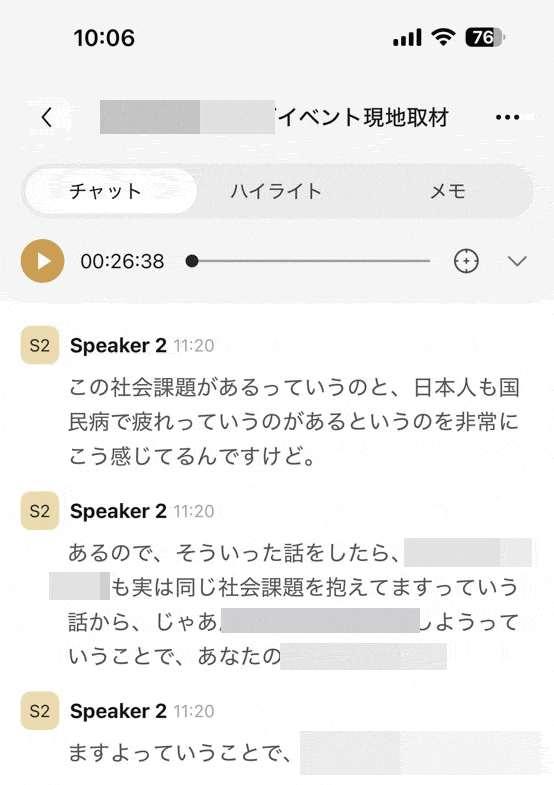
Transcription image
It also supports languages other than Japanese, such as English and Chinese. If you set the transcription language to 'Multi Language,' it will automatically detect the language and transcribe it accordingly.
Furthermore, opening the 'Notes' tab allows you to view an AI-organized summary with items like 'Overview,' 'Key Points,' 'Unresolved Issues,' and 'Chapters'. Even after long meetings, training sessions, or seminars, you can review the main points in minutes by looking here, and by providing instructions in the AI settings, you can customize the format to suit your attributes and objectives.
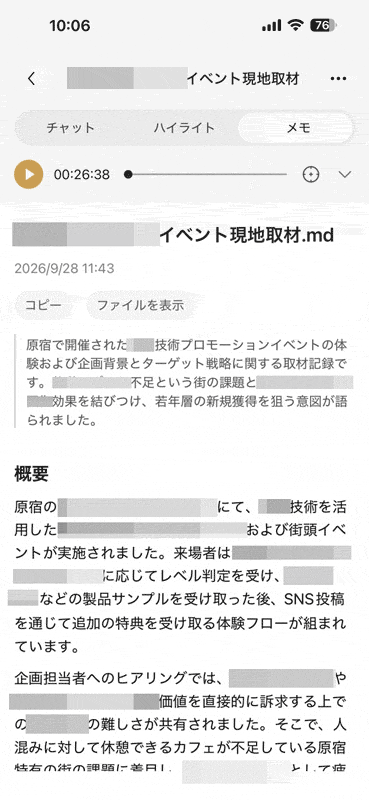
Summary image
The app's menu also offers features like re-transcription, file export, title editing, pinning, and tagging. Utilizing these is convenient for organizing and reusing registered sessions.
Extracting Next Actions and Multi-Language Support
Additionally, selecting the 'Inbox' tab from the icons below allows you to check the To-Do list (tasks) that the AI has extracted from conversations. This can also be customized to your preference, such as picking out only your tasks or changing the display period for completed tasks, and tasks are added automatically.
The 'Files' tab allows you to collectively view not only chat files but also original audio data and created notes.
Furthermore, in 'AI Settings,' you can customize the AI for yourself by registering your profession, preferred formats, and guidelines you want it to follow.
Its integration with AI and cloud services is also high; using the 'Connectors' feature, you can link it with over 500 external apps to set up automated processes. Depending on the settings, you can ask location-specific questions, and it also includes features to hide unnecessary sessions without audio and to optimize summaries by learning from past interactions.
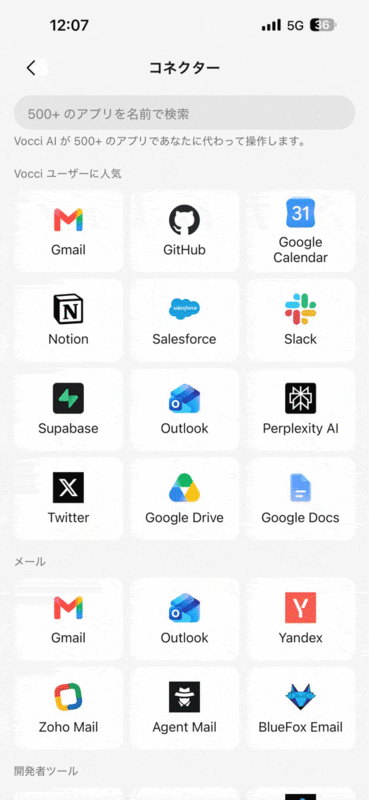
Apps compatible with the Connectors feature. The number continues to grow, exceeding 500 at the time of writing.
The time and number of uses for these features vary by pricing plan; the free 'Starter' plan offers 300 minutes of transcription and 30 AI chats per month. Those who want to use it extensively should subscribe to the paid 'Plus' (¥3,000/month / ¥22,000/year) or 'Pro' (¥6,000/month / ¥44,000/year) plans.
MCP Support Allows Accessing Recordings from ChatGPT and More
These features seem to embrace recent trends in recording devices while enhancing them to further expand the possibilities of AI.
Previous recording devices were primarily used as a form of insurance, such as 'preserving evidence in case of emergency' or 'checking missed parts'. While preserving records is good, recordings tend to be long, and re-listening to hours of audio can be challenging.
Searching for specific statements by slowly moving the playback bar based on memory is, needless to say, stressful, and accurate transcription often takes several times the recording duration. Many might have experienced transcribing meeting logs while wondering, 'After all this effort to create a perfect transcript, how useful will it actually be?'
However, AI works without complaining about minor transcription errors or unnatural Japanese. If the premise is to make AI understand and provide answers, then perfect transcription accuracy isn't always necessary.
One significant feature that distinguishes Vocci from existing recorders is its support for the 'MCP (Model Context Protocol)' mechanism. Personally, I feel this is the greatest strength of using AI-enabled voice recorders like Vocci.
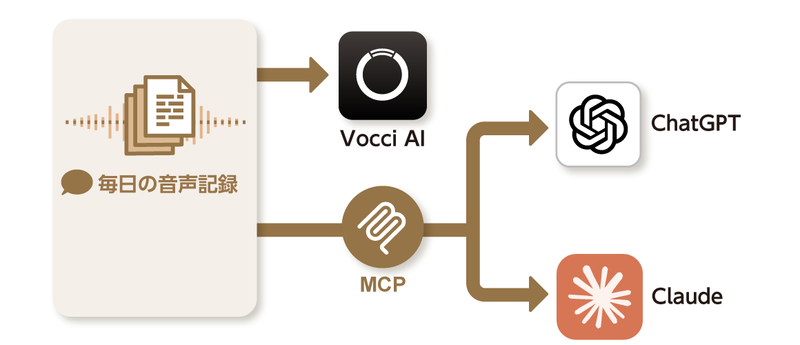
Saved data can be utilized not only from Vocci AI but also from ChatGPT and Claude via MCP.
Vocci has a conversational AI (Vocci AI) that can be used within its dedicated app. By long-pressing the button for one second, you can also send 'AI commands' via voice. This is useful if you want to proceed with tasks using only your smartphone.
Furthermore, with MCP, through account linking, you can directly reference conversation data stored in Vocci from familiar external generative AIs like ChatGPT, Claude, Gemini, and Grok, and perform various operations.
For ChatGPT, usage is simple: just type '@vocci' and enter your question or instruction. If you give instructions like 'Please extract topics related to ~ from previous conversations and organize the points,' it will provide answers based on past recorded data.
Another advantage is that the basis for its judgment becomes clear.
While MCP itself is becoming a standard interface for AI integration and isn't unique to Vocci, this integration will transform previously cumbersome and unused audio data into instantly useful information. Tasks like identifying common issues across multiple recordings or organizing your next tasks become surprisingly smooth.
Even long brainstorming sessions that failed to produce clear conclusions can reveal the essence of the discussion clearly when summarized by AI. It's also interesting to gain new insights, such as realizing that conversations heard on separate occasions were actually connected at their root.
Obtaining Accurate Answers Based on Real-World Experience
Gyges Labs describes this as a 'real-world context layer,' and the key point is that by including personal context—'who I talked to today, where I went, and what I felt'—as AI's judgment criteria, information about oneself, which was a missing piece, can be naturally inputted.
This is similar to how, when we started using email and chat tools, a history of 'who said what and when' was naturally preserved, making it easy to review. With Vocci, the history of real-world daily voice communication will also be preserved, just like with email and chat tools.
You won't need to bother writing long texts just to keep a history or notes, or ask others to 'email the meeting minutes later' or 'send the data'; you can always revisit the context of past conversations.
Nowadays, some people make it a habit to take photos or screenshots of key points from whiteboards or documents after meetings, using them as notes. Furthermore, if all you need to do is record audio, the effort spent on note-taking will be significantly reduced.
This also leads to a dramatic increase in speed when reviewing history or gathering materials before creating documents. For a writer like me, who has many meetings and interviews, I feel that a familiar and reassuring presence has emerged that will dramatically boost my work efficiency.
The Advantage of a Ring Form Factor for Constant Wear
I spent several days wearing Vocci while writing this article, and what left a good impression was the 'ease of use afforded by its ring form'.
Traditional voice recorders were often designed to be placed on a table, typically in card or stick shapes. While there are designs meant to attach to the back of a smartphone or fit easily into a pocket, each has its own purpose and advantages.
On the other hand, during interviews like press conferences without tables or when moving around an event venue listening to explanations, there are many situations where it's difficult to figure out the best way to use them. If you hold it, one hand is occupied, and if it's in your pocket or bag, you worry about whether it can pick up audio clearly. At exhibition venues, it's common to carry luggage, hold a microphone, and operate a camera while standing, but if you try to take notes on your smartphone or a paper notebook just in case, you have to take out and put away your tools (you want your hands free).
In such situations, the ring-shaped Vocci allows both hands to be free, making it easy to operate a camera or write in a notebook without difficulty.
The Value of Being a Dedicated Voice Recorder
Furthermore, avoiding 'unexpected interruptions' that often occur when using smartphone recording apps also contributes to a sense of security. I have repeatedly encountered problems where I missed important conversations because someone called or the doorbell rang while I was recording on my smartphone.
While measures like airplane mode or temporarily turning off notifications can be taken, there are times when communication cannot be cut off, and it's also common to forget to turn notifications back on after disabling them. The peace of mind that it can reliably record independently regardless of the environment, and that data is stored separately from the smartphone, is also significant.
I also found the accuracy of voice pickup to be very high. I tested its functions in various scenarios, including meetings, event coverage, and presentations with interpreters where Japanese and English were spoken alternately, and it recognized conversations naturally in all of them.
What particularly impressed me was its performance in noisy commercial facilities and exhibition venues with background music. While typical AI meeting minute tools are strong in quiet rooms where people speak one by one, their recognition accuracy drops sharply when the surroundings are noisy or conversations overlap.
In this regard, Vocci excels at separating conversations from background noise; in environments where I could hear the speaker's voice with my own ears, it produced clear recordings focused on the speaker's voice. The fact that it can be used stress-free, even in less-than-ideal recording environments, is another welcome point.
I also tried recording the same scene with a smartphone that has relatively high microphone performance. While the audio quality was superior to Vocci's, background noise (like keyboard typing sounds) was strongly picked up, making it difficult to understand not only for transcription but also when listening back myself. This is likely due to the difference between capturing ambient sounds for a sense of realism in videos and accurately recording only voices.
The white LED that illuminates during recording also has the advantage of being practical yet not overly assertive. Not only can you quickly confirm the recording status, but it also naturally indicates to the person you're interacting with, 'I'm recording now' or 'I've stopped,' allowing for conversations with a sense of trust.
Several Points to Note When Using Vocci
On the other hand, there were a few points of concern.
One is the waiting time of several to over ten minutes that occurs from the end of recording until transcription and summarization are complete, due to transmission to the smartphone and cloud processing. This is somewhat unavoidable (and I don't think it's particularly slow), but since AI summaries are displayed only after all processing is finished, it's difficult to check results immediately after recording, requiring you to use it with ample time.
Next is the operational cost. Even if you're not a heavy user, if you want to utilize it to a certain extent, subscribing to a paid plan (Plus or Pro) will likely be essential. In other words, a monthly maintenance fee of around ¥3,000 to ¥6,000, separate from the device's purchase cost, is unavoidable. Even so, it offers sufficient value for those who want to fully leverage daily conversations and interview data as assets, but many will likely find the burden significant.
Finally, as a general point, there are also precautions to be aware of when using AI-enabled recording devices, not just Vocci. When typing in emails or chats, there's an unconscious moment of selecting 'information that can be kept' and 'information that shouldn't be kept,' or 'information that can be sent' and 'information that shouldn't be'. Conversations not put into text usually just disappeared.
AI voice recorders are designed to continuously upload recorded information to the cloud during use. While it allows for easy recording of daily conversations as a life log, it also means that all history of actions and conversations is preserved during use. Private conversations and confidential information could be unintentionally recorded, posing a significant risk if leaked.
What concerned me was the absence of a setting in the Vocci app to directly check/delete recorded data remaining on the ring itself. Presumably, data is automatically deleted when synced with a smartphone, but I'm slightly concerned about whether data is truly protected when disposing of or transferring the device to someone else.
Also, when first launching the app, there's a step to agree to the terms of service and enable AI features, and you can choose to turn AI data sharing on or off in the settings screen. However, such terms and conditions and usage scope documents are long and arguably not easy for everyone to understand.
This isn't limited to Vocci, but manufacturers developing AI-powered devices and services should provide clear communication on how data is protected in the cloud, how to reliably delete unnecessary data, and what are model cases for privacy-conscious usage. I believe that by creating an environment where users can utilize it without anxiety, Vocci will become an even more appealing device.